

USER EXPERIENCE DESIGN
OMI
Your Calm Companion
OMI is an anxiety-calming app designed to support users during panic attacks through haptic feedback, calming visuals, breathing guidance, and gentle emotional reassurance.
USER EXPERIENCE DESIGN
OMI is an anxiety-calming app designed to support users during panic attacks through haptic feedback, calming visuals, breathing guidance, and gentle emotional reassurance.

THE PROBLEM
Many existing anxiety tools focus on prevention or reflection, but not the actual moment of a panic attack. During panic, users may feel overwhelmed, isolated, and unable to process complicated interfaces.
Busy wellness apps can increase stress during panic.
Separate calming devices are expensive and easy to forget.
Users need something discreet, immediate, and accessible.
CORE UX FEATURES
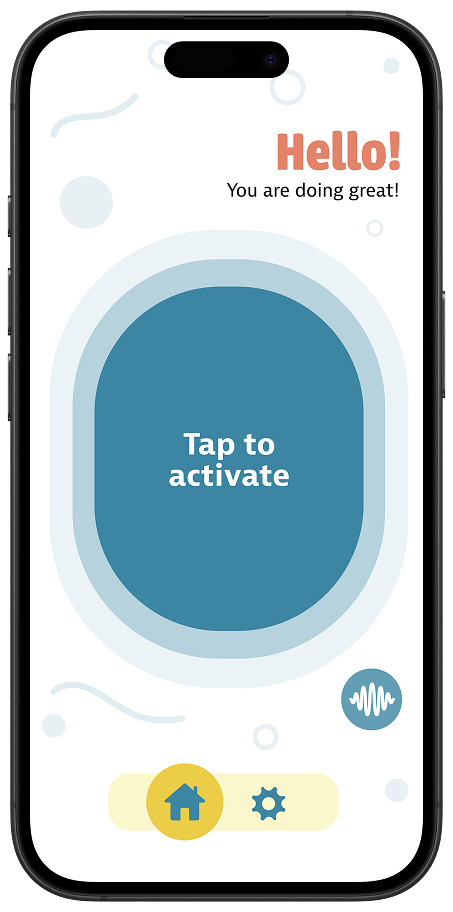
The main calming button is the largest element on the home screen, making it easy to find when users are distressed.
Phone vibrations guide the user through inhale and exhale moments, turning the device into a calming tool.
A soft pulsing visual supports the breathing rhythm without adding too much information to the screen.
Users can choose trusted contacts to receive a gentle message when extra support is needed.
If the phone locks, breathing information can still appear on the lock screen so the user can continue calming down.
Vibration strength, notifications, and support settings can be adjusted to suit different sensory needs.
USER JOURNEY
The main journey follows a user on crowded transport as anxiety begins to rise. OMI reduces the steps between feeling overwhelmed and receiving support.
Anxiety starts building in public.
User opens OMI or taps a reminder.
The large calm button starts vibration.
Visual and haptic cues guide breathing.
User stops when calmer and receives support.
USER TESTING
Testing showed that the vibration feature helped users feel more physically connected to the calming experience.
Users were able to move through onboarding and reach the main calming function without difficulty.
Feedback showed that the concept was useful, but users wanted more calming options in future versions.
KEY ITERATIONS
ETHICS & ACCESSIBILITY
Because OMI supports users during vulnerable emotional moments, privacy, consent, accessibility, and emotional safety were key parts of the UX decision-making.
Users should know where their data goes and what it is used for.
Support contacts should agree before receiving alerts.
Visual and audio cues support users who may not feel vibration.
Users can adjust vibration strength and notification settings.
FINAL OUTCOME
OMI became a user-centred calming tool focused on simplicity, reassurance, and control. Through testing and iteration, the prototype became clearer, more accessible, and more aligned with the needs of users experiencing anxiety.